

-
-
-
-
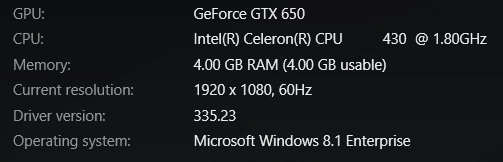
(The following information from Nvidia) GPU: Geforce GTX 650 CPU: Intel ® Celeron ® CPU 430 / 1.80GHz Memory: 4.00 GB RAM (4.00 GB usable) Current Resolution 1920 x 1080, 60Hz Driver version: 335.23 Operating System: Microsoft Windows 8.1 Enterprise Pc scanned. errors fixed. Pc defragged.....A lot of space in Hard drives and the pc is SO slow. FPS at L.o.L : 1-30 with everything on ''Very Low'' ''No shadows'' ''No Vsync'' Is it just that windows 8.1 are Sh**tty????


-
i want boost.
-
Καλάα Χριστούγεννα mxc με υγεία και ευτυχία!
-
Άσε μωρέ με ένα κακομαθημένο
-
-
-
o allos epaize video games kai tsirize xaxax pos ton koitagane oi alloi "o.O"
-
-
looks good . I saw it's characteristics on google and it's nice. I have samsung galaxy s3 u can think about it too it's an awsome phone with huge screen
-
κι έλεγα δεν θα το πει σήμερα? :P τώρα που το παρατηρω το ακόμα με το πάντως στο τέλος δεν πρέπει νάναι σωστό συντακτικά. πάει ή ''ακόμα κι αν δεν είσαι στα αλήθεια ένα εξ'αυτών'' ή ''αν και δεν είσαι στα αλήθεια ένα εξ'αυτών πάντως ''κι έλεγα δεν θα το πει σήμερα? :P


Important Information
This community uses essential cookies to function properly. Non-essential cookies and third-party services are used only with your consent. Read our Privacy Policy and We have placed cookies on your device to help make this website better. You can adjust your cookie settings, otherwise we'll assume you're okay to continue..