
911reg
-
Posts
425 -
Joined
-
Last visited
-
Days Won
37 -
Feedback
0%
Content Type
Articles
Profiles
Forums
Store
Everything posted by 911reg
-
You can edit ugx files using L2Tool, i think https://github.com/acmi/l2tool
-

Request Add bleed blood on hit and skill dmg possible?
911reg replied to ๖ۣۜG๖ۣۜL๖ۣۜO๖ۣۜR๖ۣۜY's question in Request Server Development Help [L2J]
well then, again, you can do some workaround with the server sided bleed abnormal effect -
Request Add bleed blood on hit and skill dmg possible?
911reg replied to ๖ۣۜG๖ۣۜL๖ۣۜO๖ۣۜR๖ۣۜY's question in Request Server Development Help [L2J]
I suppose you could do something like changing soulshot effects, what do you wanna do exactly? a passive skill for a single class or something like that? also, which client are you using? Either way, it should be possible to do something that from the server's source, you could take a look at abnormal effects and try to do some workaround with em -
Help i need help in geodata generating
911reg replied to ISAM_MISTRO's topic in [Request] Client Dev Help
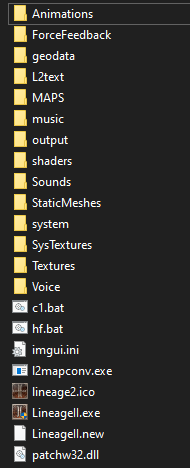
simply put all the files inside your client's root folder, then edit hf.bat like this: l2mapconv.exe preview "YOUR LINEAGE 2 ROOT FOLDER" 22_22 pause here's a map with coords so you can look for whatever map you want, credits to deMEV the client's folder should end up looking like this: example of generated geodata on a custom map
-
Help L2 DPI Scaling. Any Ideas?
911reg replied to richard37's question in Request Server Development Help [L2J]
There are some 'ways', which chronicle are you playing? or are you playing official? edit: either way, you can just use XDatEditor to increase the size of the ingame font, or even the size of some windows, but that's gonna take a lot of time, i'd suggest you to just edit the font sizes, here's an example of what you can do: the icon on the top right corner is 32x32, so you get an idea of how big the text is here's a link, in case you're interested https://disk.yandex.ru/d/W8JN8-KhCQGEYg -
Help Does anyone know how to change the map to another language
911reg replied to metalmax's topic in [Request] Client Dev Help
Which chronicle are you using? are you using any custom interface? either way, what you're looking for is inside L2Font-e.utx, in your SysTextures folder. You need to change these images -
it's not through .xdat, it's through interface.u, you can simply copy eMommy's code and add it to the script in case you don't have any sources, you can download that one. It should be the same process regardless of the chronicle you're using
-
Tool UE2004 for Split9 textures (No problem with RGBA8RawData)
911reg replied to Rolo's topic in Client Development Discussion
try this one instead, i cleaned it off a bit so it's really lite, just make sure to put it in your client's root folder, otherwise some texture dependencies might get fucked up. Plus you can directly open the client's utx files without having to decrypt them https://drive.google.com/file/d/1jTiNqL6R-Bq5ISJUNG-sMIzcO5YN_5d2/view?usp=sharing -
Share Lineage 2 Ultimate Client Collection
911reg replied to Finn's topic in Client Development Discussion
http://akumu.ru/lineage2/patch-maker.html -
wdym? simply add a new line like this
-
nah, it doesn't. We did this on our server, i.e.
-
There is no player name in systemmsg-e.dat. You could simply add an empty string and add $c1 on it, for example, and then tell the server to send the new ID and replace $c1 with the player's name. i.e.: $c1 has obtained $s3 $s2. $c1 = player name (your char or anyone else's char) $s3 = item quantity $s2 = item name
-
if you wanna open retail files you can just use L2Editor either way, give more details on what you want to do exactly or ppl won't be able to help
-
Hey miss, keep it up!
-
though something being 'retail' doesn't necessarily mean it's a good thing, i.e. dual boxes
-
Are CH doors working fine? nice share!
-
suggestion Change Preview Server + Private Server Sections
911reg replied to L2Review's topic in Suggestions/Feedback Board
Aww, what a butthurt little bitch, cmon! ain't my fault that you take everything literally. The point is: 1- There are both useless and useful comments on many old topics 2- Comments can be useful whether they're related to the server or not, there is literally no reason to delete them 3- You indeed say that if a topic is old it should be deleted. 4- Bump button literally puts your server in the first place of private servers list. It's up to you whether you wanna keep the post updated or not. If you bump your server even if it's old it means that it is either online or gonna re-open soon, so 'offline servers' will always be on the bottom of the list, at which point noone is gonna see them, so, again, no point on deleting old posts. 5- Go touch grass -
Can confirm, he can't even think of a name for his own server
-
Discussion question about creating a server skills
911reg replied to maxhacker32's topic in General Discussion [English]
you should rather learn general programming skills, try to find a job with them, then start working on L2 as a hobby, otherwise that's a very fucking stupid question lol -
suggestion Change Preview Server + Private Server Sections
911reg replied to L2Review's topic in Suggestions/Feedback Board
That's false, while it may be true that some old comments are useless, there are also old comments that are really useful, whether they're related to said server or not. Also, saying that 'if a topic is old it should be deleted' is stupid af, since that's the reason why the 'bump' button exists. And i doubt you'd be retarded enough to be looking for servers that opened 5 years ago and haven't been bumped ever since. Negative comments are allowed, as long as it's not just trashtalking bullshit but a constructive comment. -
you should try to learn how to make a topic, wtf
-
Discussion need l2 server to play
911reg replied to anfeil33's topic in General Discussion [English]
dunno what's the logic here, you want to join a server so your PC plays for you and you do nothing but scratch your balls? or is it that you want to have more gear than other people so you can feel like you are a better player? why not play a cookie clicker instead? lol -
Share Lineage 2 Ultimate Client Collection
911reg replied to Finn's topic in Client Development Discussion
there should probably be a pinned topic with those links, in case you wanna go ahead and do that, either way thanks -
not really all you need is here: https://github.com/acmi/xdat_editor and https://docs.unrealengine.com/udk/Two/SiteMap.html it ain't hard to do but since not much people have experience working with interfaces, i doubt anyone is willing to do it for free
-
Help Multiskills Hi5, Animations, textures?
911reg replied to Shadin's topic in Request Support [English]
Rapier and crossbow animations don't come with H5 animations by default, i had to manually import missing animations from higher chronicles to h5. What you can try, for example, is adding 1HS animations as Rapier animations instead (it'll look clunky, but it's something). What's important about L2 Editor is that you can see the names of the animations on the left panel, as i've shown you on the previous image (this one) that way you can see which animations you can use in order to make lineagewarrior.int work properly. Anyway, if you wanna make it work with all weapons, simply copy/paste Dual Swords animations and use them as Dual Daggers, same with Rapiers and One-Handed swords, and Bows and Crossbows, and if it doesn't meet your quality standards, sadly, you'll have to either import all animations from higher chronicles and re-do their AnimNotifies by hand (which might take months to do, i'd say it's not even worth it), or pay someone to do it for you, i'd suggest you to buy @NevesOma's animation packs in that case, since he did an amazing work with those files In case you wanna go ahead and import animations you should probably learn: -basic 3dsmax -how to import .psa and .psk files into unreal editor and make them work with L2, for which you'll need to buy Gildor's tools, you can find details here: https://www.gildor.org/smf/index.php?topic=155.0 -how to add missing AnimNotify scripts to your unreal engine -how to add AnimNotifies to all animations (this is the most tedious part, which takes the most time, so you'll probably wanna learn how to make macros with AHK as well) overall it's a hard ass work and it's probably not even worth it if you don't plan on re-selling those files btw, what did you mean by 'do you know what I have to edit for the robe and heavy animations for kamaels?' ? i'm guessing you mean how to add robe and heavy armors for kamaels? cuz animations don't depend on your armor if you wanna add heavy and robe for kamael, you can't sadly, since koreans didn't even create those armors, so you can't even import them from other chronicles, unless you wanna make your own meshes with blender or 3dsmax