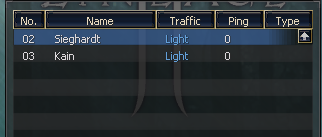
Since I see people asking for this every now and then I thought I'd code it and share it.
L2Proxy is a simple MITM proxy for your L2 server.
It comes in two parts
The Java side
The L2Proxy service
The Java side can be used on any pack and with any proxy configuration without needing the app. If however you don't wanna mess with proxy configuration you can also use the L2Proxy service which runs a MITM proxy for your players. It is fully cross platform and will run fine on any VPS as long as you have the network bandwidth needed. It adds some extra functionality that you might find handy.
Proxies with Gameserver invisibility turned on
Features
Gameserver invisibility option - You are able to hide your server behind the proxies and keep your real server IP secret
RealIP - Usually with MITM proxies, since the traffic is funnelled from one server, you normally lose the real IP of the player which limits a lot of the functionality that you might have implemented. L2Proxy allows the LoginServer to pass the real IP of the used to the Gameserver during the Login->Gameserver player handoff
An API - You can use the API in L2Proxy to check the stats of your Proxies, see the active connections to it and even disconnect a specific use IP or blacklist it
IP Blacklist - You can blacklist a specific IP its connection will be rejected on the proxy level before it ever gets to the gameserver. This includes malicious connections. You can also use the API to blacklist someone and get them instantly disconnected.
Multiple Proxies from one app - No real reason for this to exist but I added it anyway
Proxy health detection. If the proxy goes down the proxy listings will appear as down as well. (This feature requires the L2Proxy service). Validation can be turned off by setting the "validateHealth" option to false.
Unhealthy proxy fallback. If all proxies are down and the "fallbackToGameserver" setting is set to true then even if you've chosen to hide the gameserver, it will appear as a fallback so people can still login when the proxies are down.
MaxConnections on each proxy. Once the limit is met, no more connections can be made to the gameserver via the proxy. -1 means unlimited
API Actions
To make actions you need to set the x-api-key header to equal to the API Key setting in L2Proxy. The default is "changeit".
Get all proxies - GET http://localhost:6969/api/proxies
Get proxy by IP and Port - GET http://localhost:6969/api/proxies/127.0.0.1/7778 (IP is the proxy ip and 7778 is the proxy port)
Disconnect an active connection - DELETE http://localhost:6969/api/proxies/127.0.0.1/7778/127.0.0.1/11571 (First IP is the proxy IP, second ip is the client ip, first port is the proxy port and second port is a client port)
Get all blacklisted IPs - GET http://localhost:6969/api/blacklist
Check if IP is blacklisted - GET http://localhost:6969/api/blacklist/127.0.0.1 (The IP is the user IP)
Blacklist an IP and disconnect used - POST http://localhost:6969/api/blacklist/127.0.0.1 (The IP is the user IP)
Removed an IP from the blacklist - DELETE http://localhost:6969/api/blacklist/127.0.0.1 (The IP is the user IP)
proxy.xml
<?xml version='1.0' encoding='utf-8'?>
<list>
<config />
<!--
serverId: The true id of the gameserver
hide: When enabled, the true gameserver will not appear in the server list
fallbackToGameserver: When the proxy server is down, when true, the real gameserver will appear
proxyServerId: The gameserver id that the proxy will use to be listed in the server list
proxyHost: The host of the proxy
proxyPort: The port of the proxy
apiPort: The port of the API for the proxy
apiKey: The api key for the proxy api
-->
<gameserver serverId="1" hide="true" fallbackToGameserver="false">
<proxy proxyServerId="2" proxyHost="127.0.0.1" proxyPort="7778" validateHealth="true" apiPort="6969" apiKey="changeit"/>
<proxy proxyServerId="3" proxyHost="127.0.0.1" proxyPort="7779" validateHealth="true" apiPort="6969" apiKey="changeit"/>
</gameserver>
</list>
Here is a diagram explaining the initial login flow. Once you login the loginserver goes away and you connect directly to the proxies or gameserver depending on your configuration.
Features I might add (don't bet on it)
Max connection limit
Make calls to the API to let the gameserver know the proxy status and make proxy level action
Proxy service discovery to propagate proxy actions to all running proxies
Automatic proxy suggestion based on proxy load
You currently need to blacklist the IP on each proxy API since the data is not shared
Download link and executables of latest version: https://github.com/Elfocrash/L2Proxy/releases/tag/v0.2.0
If you run the framework dependent version you need .NET 5 CLR installed. If you run the standalone versions you don't need anything preinstalled.
Will upload a video of the thing at some point. It's late.
Enjoy