Skip to content

New Signature ON*

Featured Replies

48439074.png


All opinions accept :)

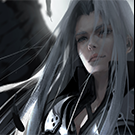
Where is your render?

  • Author

Where is your render?

In the render lol don't try say u can't see it :3

First, i dont understand what are you trying to said. Second, yes I cant see any render anyway..

Pretty good. ^^

I would have used another font/color for the sub-text or just left it out completely. But its okay.

I generally dislike white borders if they stand out too much but that isn't really criticsm. haha

  • Author

First, i dont understand what are you trying to said. Second, yes I cant see any render anyway..

You are trying looking as a pro :# anyway..

Pretty good. ^^

I would have used another font/color for the sub-text or just left it out completely. But its okay.

I generally dislike white borders if they stand out too much but that isn't really criticsm. haha

Well I have do it much better from this signature.

~ I keep the comment for the "borders" hahaha :P

You are trying looking as a pro :# anyway..Well I have do it much better from this signature.


No mate, I just tell you that I can't see the render its kind of mess. Anyway, as a rest is ok.

  • Author

No mate, I just tell you that I can't see the render its kind of mess. Anyway, as a rest is ok.

Well i didn't say something dude :P

Anyway, ty :)


-Zelan

No mate, I just tell you that I can't see the render its kind of mess. Anyway, as a rest is ok.


It is not necessary to have a render.

Really i like it :D

Signature is amazing!

Good Job dude :)

  • Author

Really i like it :D

Really thanks, i'm try for the better :)

Signature is amazing!

Good Job dude :)

Well i believe your opinion is really help me(the opinion from a GFX) anyway thank you :)

Create an account or sign in to comment

Account

Navigation

Search

Search

Configure browser push notifications

Chrome (Android)
  1. Tap the lock icon next to the address bar.
  2. Tap Permissions → Notifications.
  3. Adjust your preference.
Chrome (Desktop)
  1. Click the padlock icon in the address bar.
  2. Select Site settings.
  3. Find Notifications and adjust your preference.