

-
I can help with that text me in telegram @abaddonbg
-
You still looking for autofarm?
-
Is there any auto clicker that works on servers with anticheat? im looking for one😁
-
Hello guys.Im looking for a simple autoclicker that works for servers with anticheat
-
Hello guys. I want to know if there is a way(script or something) to make character go to castle after death in adrenaline bot
-
No one?
-
Hi guys! I want to ask if someone tried playing lineage 2 server with game guard on winlator and is it possible to do it
-
So i have a script for specific server but i want to make it to detect when quest is completed can anyone help ? Script: var i:integer; begin print(user.target.attackable); while true do begin delay(user.cast.endtime); for i:=0 to CharList.count-1 do if ((not CharList.Items(i).Dead) and (not CharList.Items(i).Name.Contains('Bot')) //and CharList.Items(i).attackable //and CharList.Items(i).InZone //and (CharList.Items(i).ClanID<>User.ClanID) ) then begin engine.settarget(CharList.Items(i)); Engine.UseSkill(19); break; end; while ((not user.target.dead) and (not user.dead)) and (not user.target.Name.Contains('Bot')) do begin Engine.UseSkill(19); Engine.UseSkill(369); Engine.UseSkill(101); delay(user.cast.endtime); end; engine.canceltarget; end; end. Is it even possible with this script ?
-
Will hwid spoofer help ?
-
Hi guys. I want to ask you if there is any way to bypass/remove hwid ban? Im banned on destorus.ru if that is going to help . :)
-
yes i do
-
Hi guys can someone tell me why do i get this error when im using cracked adrenaline bot please?
-
Thanks
-
Hi guys im using script for adrenaline bot to farm this kind of mobs How can i make it so it wont target Anti Bot's ? Here is my script : Help me please 🙂
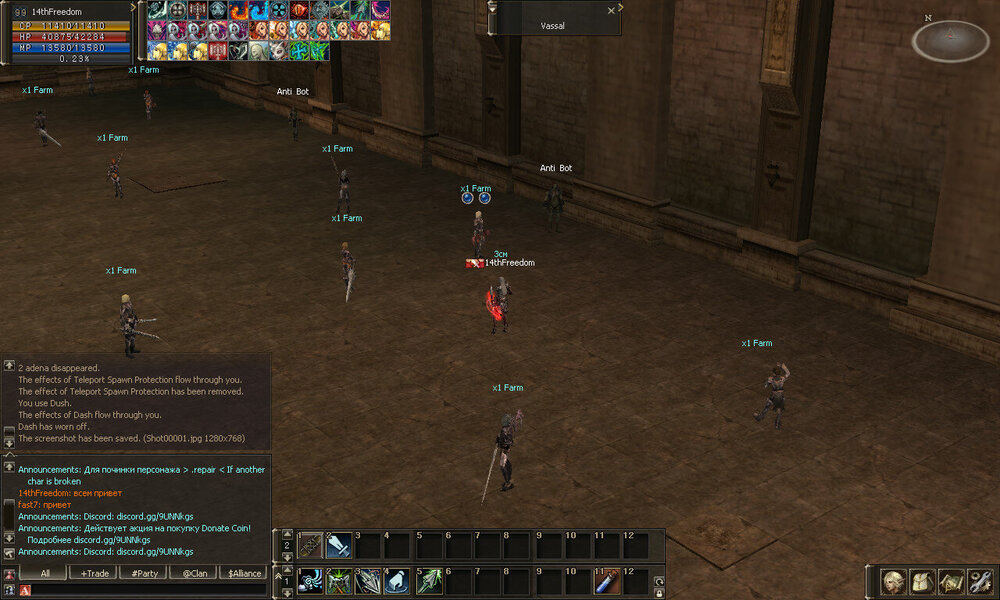
-
Hey Its me againt This is my script : How can i make it so it checks targets title and if it contains specific word for example than it starts attacking ? Please help 🙂
