
-
18gYNo8AE6Lx_zju7qbylDpebmaN34BSaEamA5SrJL4
-
Try to turn off retarget function in olympiad settings.
-
This is not software i mentioned, im not working with UT package tool. https://i.gyazo.com/1e1a8ba2f7cc1c3d0313fa8e48675c97.png
-
as i said
-
try unreal x-editor
-
cadanj changed their profile photo
-
Not in interface.xdat but interface.u
-
Of course. You need to edit class MenuWnd.uc on line 44. Then recompile it.
-
I know but there is no reason to delete credits if he provided it free for us. I've fixed critical error by installing fresh game and uploading patch again Its already compiled, there are two download links on his website. Or you can use updated version in this post.
-
Looking for same solution, if any.
-
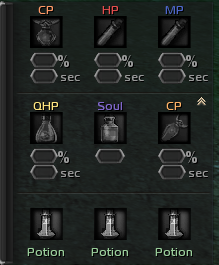
Thank you a lot, i literally love you ! <3 Can you please give me advice or tip how to allow there to use Warrior's Temporary Healing Potion? Is that possible? Instead of Soul or small CP potion?

-
Finally i've fixed font problem ! :) I've just put this file to system again. https://mega.nz/#!q7hGyI6Q Im going to try your target fix. Thank you ! :)
-
Same here. No target windows + big font
-
Ive already tried to install this font since is included in oldest patch. But no effect :/
-
Cool working now but font have extra large size so sometimes it make trouble to read some text. I've also installed that font which is in system folder with no changes. Any way to fix it? :) Thank you

-
I can't make it work, have anyone please some tip how to fix this? Thank you for any feedback.