

Everything posted by theone
-
for C1 servers: 10.2.3: $004DE3A8
-
try in-game walker with a verify emulator
-
yeah... they don't work at all :roll:
-
if you mean the items id... it's in itemname-e.dat (client side), just decode and decrypt it Here's the C3 items ids:
-
Spudgy, are u saying that information/programs about bots posted in this site doesn't work at all? :? And also you want someone else to seach for a working, simple and easy-to-use hack/exploit for your server that don't requiere computer knowledge to be done, right???
-
I'll download beyond C3 patch tonight and see if i can find something, is this the right page? http://beyondc3.visiems.lt/I didn't bother opening engine.dll with hex editor, I just read the private memory of the engine.dll... just like the method you posted with hexprobe... nothing new... :P ... I guees that launcher modifies the token in memory, just like the old l2player.exe posted at post pacific a long time ago.I've just tried it, in launcher.sav there's an ip address 213.246.59.101 it seems to be L2J.... maybe i'm wrong... i don't knowit just check the files, and update it if necesary... it guess it also patch the memory to change the token (cuz engine.dll seems to be un-encrypted, i didn't looked at it, but the file size looks like the original) Reading the data with winhex, i got: - protocol is 530 - token is 5B3B272E5D36363131313D3D2D252640215E2B5D For in-game walker just hex-edit the original token at engine.dll with this token... i guess it should be enoght. PS: i'm too lazy to make an account :P, but it should connect with this token, and a walker that use C3 (530) data (i tested with 10.5.3, so 10.4.9 should works too)
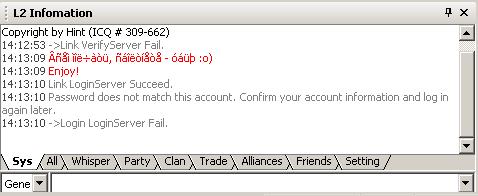
 can i have a look at that l2launcher?if you are talking about set.ini for OOG walker, it can be whatever you wants... as long as there are enoght entries, depending on how many servers they have, if there's just 1 server: ServerList=[01]firstone;trust me' date=' it works ;) ------------------ option.ini begin --------------- [Options'] Title=L2Walker 10.4.9 Server=HOBBY Token=5B3B272E5D31332D36393D3D2D252640215E2B5D OffSet=$005362F8 GMFix=0 ------------------ option.ini end --------------- PS: i hope you are not the same Kengurius here and hobby forum cuz it's a bad idea to have the same nick...i dont have this problem right now, but when i needed it, i couldn't find a fast enoght public socks server to play decently :Pit's in a sticky in this forum http://www.maxbastards.gr/portal/viewtopic.php?t=177use 10.4.9 ---- options.ini ---- [Options] Title=L2Walker 10.4.9 Server=HOBBY Token=5B3B272E5D31332D36393D3D2D252640215E2B5D OffSet=$005362F8 GMFix=0

Important Information
This community uses essential cookies to function properly. Non-essential cookies and third-party services are used only with your consent. Read our Privacy Policy and We have placed cookies on your device to help make this website better. You can adjust your cookie settings, otherwise we'll assume you're okay to continue..