Hello everyone
How are you all doing?
I'd like to share with the community an open-source project I've been working on intensely: the **L2 Phantom AI Manager**.
Tired of those static bots that just stand still in the city or sink into the map because of Geodata? Me too! That's why I developed a modular Phantom system with real Artificial Intelligence, initially designed for **L2J Mobius Essence (RoseVain)**, but which can be adapted to other chronicles.
Main Features
Modular architecture: the system is split into focused files such as PhantomAI, PhantomEngine, PhantomFactory, PhantomEquipment, PhantomHuntingSpots, PhantomGeo, PhantomMenu, and more.
Automatic creation: create 10 or 50 phantoms from the menu or commands.
XML persistence: automatically created phantoms are saved into PhantomPlayers.xml, so they keep loading after server restarts.
Batch startup: .pstart and Start 10 load only 10 phantoms at a time.
Batch disconnect: disconnect 10 active phantoms without shutting down the whole system.
Origin towns: new phantoms spawn using PlayerTemplate.getCreationPoint(), respecting race and class.
Geodata-safe spawning: spawn points use NPC-like coordinate validation to avoid under-map or floating characters.
Real datapack spots: reads data/stats/npcs and data/spawns to build level-based hunting locations.
Bad target filtering: ignores Training Dummy, tutorial objects, chests, and fake farm targets.
Smart relocation: if a phantom cannot find useful mobs, it relocates to another spot for its level.
Level goals: phantoms receive leveling goals, return to town, recover resources, and go back to farming.
Mage MP rest mode: mages rest until MP is recovered; in PvP they try to escape when out of mana.
Skills and buffs: phantoms try to use offensive skills and self buffs such as Might, Shield, Focus, Haste, Empower, Acumen, Wind Walk, Chant, Song, and Dance.
Varied gear packs: gear packs by grade for mages and fighters, with multiple variants to avoid visual clones.
Automatic shots: randomized Soulshot and Spiritshot restocking by class and grade.
Inventory cleanup: unnecessary items are removed automatically while preserving Adena, shots, and equipped gear.
PvP and PK behavior: some phantoms are aggressive, may become PK, and attacked phantoms try to defend themselves.
Optional AI chat: optional Google Gemini integration for short social replies.
TXT logs: the menu displays log state and can enable/disable logging.
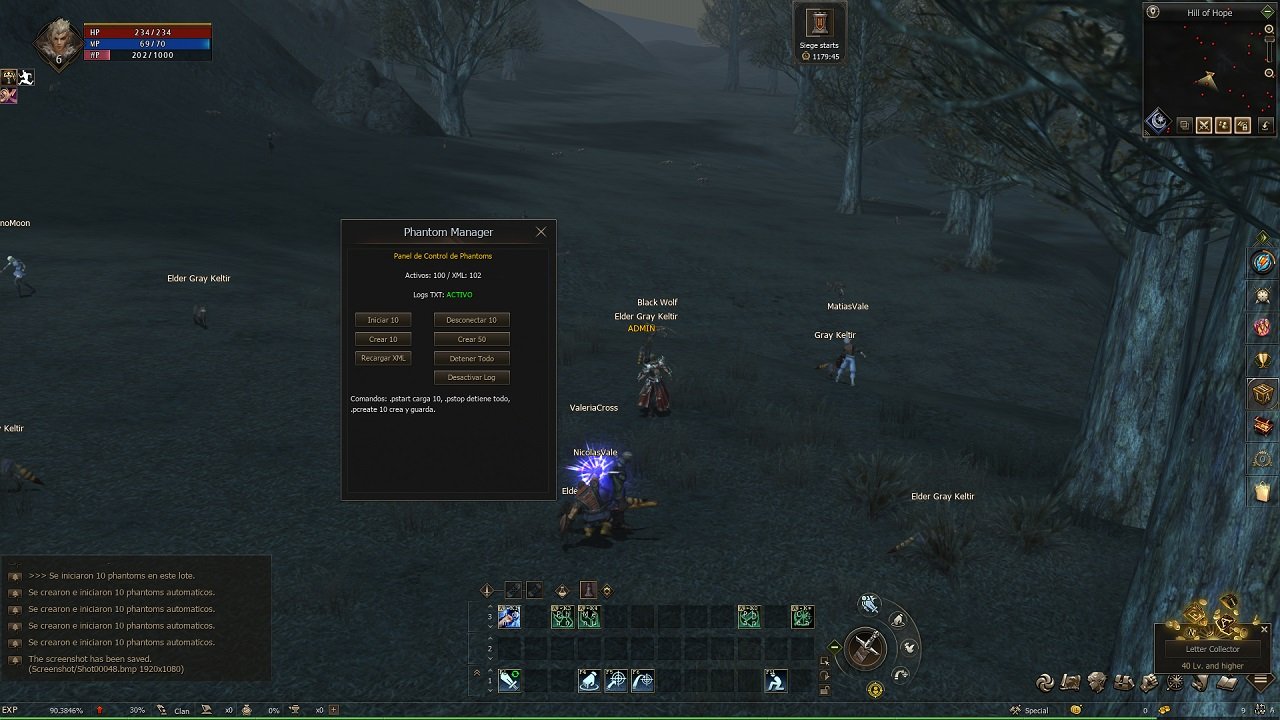
GM Menu
Use .pmenu to open the control panel.
Current options:
Start 10
Disconnect 10
Create 10
Create 50
Reload XML
Stop All
Enable Log / Disable Log
The menu also shows:
active phantom count;
XML ID count;
current TXT log state.
Commands
.pmenu - opens the control panel.
.pstart - starts 10 phantoms from XML.
.pstop - removes all active phantoms.
.pstop10 - disconnects 10 active phantoms.
.pload - reloads PhantomPlayers.xml.
.pcreate 10 - creates, starts, and saves 10 phantoms to XML.
.pcreate 50 - creates, starts, and saves 50 phantoms to XML.
.pm Name Message - sends a private message to a phantom.
.pdebug - toggles TXT logging.
Logs
Logs are created in the GameServer log/ folder:
log/PhantomManager.txt - global historical log.
log/PhantomManager-yyyyMMdd-HHmmss.txt - separate log for each session.
Useful logged events include:
new level goals;
travel to hunting spots;
town rest;
mob attacks;
PvP defense;
shot restocking;
inventory cleanup;
AI exceptions with stacktrace.
Main Files
PhantomManager.java - commands, logs, and bootstrap.
PhantomEngine.java - start, stop, spawn, respawn, batches, and AI loop.
PhantomAI.java - farm, PvP, PK, rest, targeting, and movement decisions.
PhantomConfig.java - routes, gear, shots, and XML persistence.
PhantomFactory.java - automatic character creation.
PhantomEquipment.java - buffs, progression, shots, and inventory cleanup.
PhantomHuntingSpots.java - real datapack NPC/spawn loader.
PhantomGeo.java - geodata-safe coordinate handling.
PhantomState.java - temporary phantom memory.
PhantomMenu.java - GM HTML panel.
PhantomBypass.java - menu button handling.
PhantomChat.java - messages and optional Gemini integration.
Copy custom/PhantomManager into: dist/game/data/scripts/custom/PhantomManager/
Place PhantomPlayers.xml in: game/config/Custom/PhantomPlayers.xml
Compile scripts or restart the GameServer.
Use .pmenu to create, start, and manage phantoms.
https://github.com/miacodeweb/L2-Phantom-AI





 Hello everyone How are you all doing? I'd like to share with the community an open-source project I've been working on intensely: the **L2 Phantom AI Manager**. Tired of those static bots that just stand still in the city or sink into the map because of Geodata? Me too! That's why I developed a modular Phantom system with real Artificial Intelligence, initially designed for **L2J Mobius Essence (RoseVain)**, but which can be adapted to other chronicles. Main Features Modular architecture: the system is split into focused files such as PhantomAI, PhantomEngine, PhantomFactory, PhantomEquipment, PhantomHuntingSpots, PhantomGeo, PhantomMenu, and more. Automatic creation: create 10 or 50 phantoms from the menu or commands. XML persistence: automatically created phantoms are saved into PhantomPlayers.xml, so they keep loading after server restarts. Batch startup: .pstart and Start 10 load only 10 phantoms at a time. Batch disconnect: disconnect 10 active phantoms without shutting down the whole system. Origin towns: new phantoms spawn using PlayerTemplate.getCreationPoint(), respecting race and class. Geodata-safe spawning: spawn points use NPC-like coordinate validation to avoid under-map or floating characters. Real datapack spots: reads data/stats/npcs and data/spawns to build level-based hunting locations. Bad target filtering: ignores Training Dummy, tutorial objects, chests, and fake farm targets. Smart relocation: if a phantom cannot find useful mobs, it relocates to another spot for its level. Level goals: phantoms receive leveling goals, return to town, recover resources, and go back to farming. Mage MP rest mode: mages rest until MP is recovered; in PvP they try to escape when out of mana. Skills and buffs: phantoms try to use offensive skills and self buffs such as Might, Shield, Focus, Haste, Empower, Acumen, Wind Walk, Chant, Song, and Dance. Varied gear packs: gear packs by grade for mages and fighters, with multiple variants to avoid visual clones. Automatic shots: randomized Soulshot and Spiritshot restocking by class and grade. Inventory cleanup: unnecessary items are removed automatically while preserving Adena, shots, and equipped gear. PvP and PK behavior: some phantoms are aggressive, may become PK, and attacked phantoms try to defend themselves. Optional AI chat: optional Google Gemini integration for short social replies. TXT logs: the menu displays log state and can enable/disable logging. GM Menu Use .pmenu to open the control panel. Current options: Start 10 Disconnect 10 Create 10 Create 50 Reload XML Stop All Enable Log / Disable Log The menu also shows: active phantom count; XML ID count; current TXT log state. Commands .pmenu - opens the control panel. .pstart - starts 10 phantoms from XML. .pstop - removes all active phantoms. .pstop10 - disconnects 10 active phantoms. .pload - reloads PhantomPlayers.xml. .pcreate 10 - creates, starts, and saves 10 phantoms to XML. .pcreate 50 - creates, starts, and saves 50 phantoms to XML. .pm Name Message - sends a private message to a phantom. .pdebug - toggles TXT logging. Logs Logs are created in the GameServer log/ folder: log/PhantomManager.txt - global historical log. log/PhantomManager-yyyyMMdd-HHmmss.txt - separate log for each session. Useful logged events include: new level goals; travel to hunting spots; town rest; mob attacks; PvP defense; shot restocking; inventory cleanup; AI exceptions with stacktrace. Main Files PhantomManager.java - commands, logs, and bootstrap. PhantomEngine.java - start, stop, spawn, respawn, batches, and AI loop. PhantomAI.java - farm, PvP, PK, rest, targeting, and movement decisions. PhantomConfig.java - routes, gear, shots, and XML persistence. PhantomFactory.java - automatic character creation. PhantomEquipment.java - buffs, progression, shots, and inventory cleanup. PhantomHuntingSpots.java - real datapack NPC/spawn loader. PhantomGeo.java - geodata-safe coordinate handling. PhantomState.java - temporary phantom memory. PhantomMenu.java - GM HTML panel. PhantomBypass.java - menu button handling. PhantomChat.java - messages and optional Gemini integration. Copy custom/PhantomManager into: dist/game/data/scripts/custom/PhantomManager/ Place PhantomPlayers.xml in: game/config/Custom/PhantomPlayers.xml Compile scripts or restart the GameServer. Use .pmenu to create, start, and manage phantoms. https://github.com/miacodeweb/L2-Phantom-AI